


Partner Management Software for HubSpot Users: How to Choose
Last updated: November 3, 2026.
HubSpot does not include a PRM, so teams that run partners on HubSpot pick one of three setups: build it in HubSpot, install an app that stores partner data in HubSpot, or use a platform that keeps its own records and syncs both ways. The right choice depends on where you want the partner record to live.
This guide is for a head of partnerships or partner manager whose team already runs on HubSpot. Every fact comes from a vendor's own page, HubSpot's documentation or Kiflo itself, with the date it was checked. "Not stated" means the page says nothing on the point.
Best HubSpot PRM options at a glance
If you want the shortlist first, this table says what each of the seven platforms fits, going only by the vendors' own pages (checked 20 October 2026, Kiflo also by the Kiflo team). It is a reading of those pages, not a tested ranking. Sources and detail follow in the comparison below.
| Platform | Consider it when |
|---|---|
| Kiflo | Partners need their own login, you want to choose field by field what syncs, and the rep needs partner overlaps on the HubSpot record. The partner record lives in Kiflo. |
| RocketPRM | You want everything inside HubSpot and your plan already includes Content Hub Pro+. |
| Introw | You want a partner portal that writes straight into HubSpot and you are happy for HubSpot to be the record. |
| JourneyBee | You want partners to work outside HubSpot while the data returns to it, on any HubSpot plan, per its page. |
| Channeltivity | You want to set the sync direction, one way or two way, per field mapping. |
| Impartner | You need custom objects synced between the platform and HubSpot. Pricing is on request. |
| Euler | Its homepage names a native HubSpot integration but publishes no detail, so put the ten questions below to Euler directly. |
HubSpot's own partner portal vs a partner portal for your program
HubSpot's partner dashboard and shared deals are for HubSpot Solutions Partners, the agencies that sell and service HubSpot. They are not a portal for your own resellers, referral partners or tech partners. To give your partners a login and register their deals in your HubSpot, you need a portal for your program, and this guide compares the ways to get one.
- HubSpot's partner dashboard: a HubSpot Partner uses it to view and manage clients, see its partner tier and points, and review commission payments from HubSpot. It requires a HubSpot Partner Account. Source: View and manage your partner dashboard, last updated 29 September 2026 (checked 3 November 2026).
- HubSpot shared deals: a Solutions Partner registers a lead as a shared deal on a contact, company or deal record, and HubSpot registers it in its own CRM and assigns it to a HubSpot sales representative. The registration is with HubSpot, not with you. Source: Create shared partner deals, last updated 28 September 2026 (checked 3 November 2026).
- A portal for your program: your partners log in, register deals with you, your team reviews them and the deal lands in your HubSpot, when it is created or once your team approves it, depending on the setup. HubSpot does not provide this, so you build it or use an app or a platform.
Does HubSpot have a built-in PRM?
HubSpot has no built-in PRM. It holds your partners' deals, contacts and reports, but a partner-facing portal, deal registration with conflict checks and commission statements come from an app or a platform. HubSpot's Marketplace lists 34 apps in its Partner Management category (checked 3 November 2026).
HubSpot does have a "Partner Seat", and it is easy to mistake for a partner feature. HubSpot's seat documentation describes it as "a free seat that gives eligible HubSpot Solutions Partners employees access to all features in a client's account" (checked 20 October 2026). It is built for the agencies that work inside a client's HubSpot. It does not give the partners who sell your product a login of their own.
What HubSpot does well is the CRM half of the job: deals, contacts, forms, workflows and reports. Putting partner records on their own objects is a bigger step, because HubSpot's custom objects documentation lists custom objects under Enterprise subscriptions (checked 20 October 2026). For the difference between a CRM and a partner platform, see CRM vs PRM. For what a PRM covers, see the guide to PRM software features.
Three ways to run partners on HubSpot
You can run partners on HubSpot three ways: build a portal and workflows in HubSpot yourself, install an app that keeps partner data in HubSpot, or use a platform that holds its own partner records and syncs with HubSpot both ways. The difference that matters is where the partner record lives.
| Setup | Where the partner record lives | What you need on the HubSpot side | Fits when |
|---|---|---|---|
| Build it in HubSpot | HubSpot deals, contacts and companies | Forms, workflows and reports. Custom objects need an Enterprise subscription. A login-protected portal means building on Content Hub (RocketPRM, which does, names Content Hub Pro+) | Partners register deals through a form and nobody outside your team needs to edit them |
| An app that stores partner data in HubSpot | HubSpot records. RocketPRM describes contacts and deals; Introw describes deals, leads and custom objects | Depends on the app. RocketPRM names Content Hub Pro+ and Marketing Hub Pro or Sales Hub Pro. Introw names no plan | You want one system of record and your HubSpot plan already covers the app |
| A platform with its own records, synced both ways | The platform, kept in step with HubSpot companies, contacts and deals | The permission to connect. Kiflo needs no particular HubSpot plan; JourneyBee says its integration works with Free through Enterprise | Partners need their own login and workflow, or you run more than one CRM |
Sources: RocketPRM and Introw pages, JourneyBee's integration page, Kiflo (all checked 20 October 2026); HubSpot's custom objects documentation, linked above.
The record's home decides what happens when you change CRM, add Salesforce or leave a vendor. A record kept in HubSpot stays in HubSpot when you change vendor. A record kept in the platform has to be exported.
How deal registration works with HubSpot
Deal registration with HubSpot means your partners register opportunities with you, your team reviews them, and the deal is created in your HubSpot with the partner attached, either when it is submitted or once your team approves it, depending on the platform and how it is configured. You can run it with a HubSpot form, a workflow and a partner property, or with an app or platform that adds partner logins, conflict checks and stage sync.
The five steps any setup has to cover
- Submit. The partner enters the customer, the contact, the deal value and the product interest, through a form or a portal.
- Check. The submission is compared with existing HubSpot deals, companies and other registrations to catch overlap.
- Decide. Your team accepts or refuses the registration, and the partner is told.
- Create. A HubSpot deal is created in the right pipeline with the partner and the contact attached. Depending on the setup, this happens when the registration is submitted or once your team approves it.
- Protect and follow. An expiry date limits the protection, and stage changes stay in sync so the partner and the rep see the same status.
A HubSpot form and a workflow can handle steps 1, 3 and 4 for a small program. Steps 2 and 5 are where teams add an app or a platform, because a form does not show the partner the stage of the deal and does not flag a second partner registering the same account.
How it works in Kiflo
Flow of a registered deal between the partner, Kiflo and HubSpot, from Kiflo's help center articles on HubSpot and deal expiration (checked 3 November 2026). Kiflo sends the deal to HubSpot when it is created or once it is accepted, as you configure.
- Submit. Partners register deals in the partner portal or through a personal form that needs no sign-in. The form has up to three parts: the deal, the client's contact details, and optional line items for resellers who select products. You choose which properties appear. See how to customize the deal registration form.
- Check. Conflict detection is included from the Plus plan. Kiflo compares the client's email domain with existing deals, leads and customers, and checks HubSpot deals natively.
- Review. You choose who validates: anyone on your team, the deal owner only, or no one, in which case deals are accepted automatically. When your team accepts a deal, you can set an expiration date and a reminder date, and an expired deal can be postponed.
- Sync. You choose whether Kiflo sends deals to HubSpot when they are created or only when they are accepted. Every Kiflo stage is mapped to a stage in the HubSpot pipeline you select, and fields sync both ways with a rule per field. Deals are not deduplicated, so a new deal is created in HubSpot each time, and an existing HubSpot deal is registered by its Deal ID.
- Qualify in HubSpot. If your sales team qualifies partner leads in HubSpot, a deal attached to the contact converts the lead in Kiflo and links the two deals.
- Trace. Each deal shows its last sync date and a link to the HubSpot record, and a log records every sync attempt.
To see how a partner registers a deal and how the stage syncs with HubSpot, book a demo.
What is in the HubSpot Marketplace
HubSpot's Partner Management category lists 34 apps, and 16 of them are partner management platforms. The rest are affiliate and referral tools, co-selling products and unrelated connectors. The count comes from HubSpot's listing on 3 November 2026, sorted by each app's own description, so treat the grouping as a reading, not a HubSpot classification.
- Partner management platforms (16), by install band: 500+ Introw. 200+ Kiflo. 100+ Impartner and Partner Deals Portal. 70+ Allbound. 60+ Euler. 50+ AppVentory Channels. 40+ Channeltivity. 30+ Magentrix. 20+ Channelyze, JourneyBee, RocketPRM and xAmplify. 10+ Mindmatrix Bridge, SP CE Partner Portal and ZINFI.
- Affiliate, referral and partner programs (7): Referral Factory 700+, PartnerStack 300+, impact.com 300+, LeadDyno 100+, GrowthDrive 100+, Everflow 100+, Reditus 10+.
- Co-selling and ecosystem tools (4): PartnerTap 200+, WorkSpan 20+, cocorev 40+, SaaSify 50+.
- Unrelated to partner management (7): a website builder, data connectors, a field-service tool and similar.
Install counts are the bands HubSpot publishes. They are not a ranking and not market share, and the listing shows no ratings or prices in this category. Source: HubSpot Marketplace, Partner Management, 3 November 2026.
PRM software that works with HubSpot: seven compared
The seven platforms differ in where they keep the partner record and what their HubSpot sync covers, not in how many features they list. Most vendor pages leave out which HubSpot plan is needed, and none gives a sync latency figure. Every cell in the three tables below comes from the vendor's own page (for Kiflo, also from the Kiflo team), checked 20 October 2026 unless a cell says otherwise.
Where the partner record lives
| Vendor | Where the partner record lives |
|---|---|
| Kiflo Listed as Kiflo PRM, 200+ installs | In Kiflo, kept in step with HubSpot |
| Introw Listed as Introw PRM, 500+ installs | Written into HubSpot per its listing. Whether anything is stored outside HubSpot is not stated |
| JourneyBee Listed as Journeybee, 20+ installs | Partners work in JourneyBee. The page says partner data lives in HubSpot. System of record not stated |
| RocketPRM Listed as rocketPRM, 20+ installs | HubSpot: a HubSpot-hosted portal on native HubSpot objects |
| Channeltivity Listed as Channeltivity PRM, 40+ installs | Not stated. Registrations push to HubSpot and HubSpot deals import into Channeltivity |
| Impartner Listed as Impartner PRM, 100+ installs | Not stated. The sync runs on Impartner's CRM Sync engine |
| Euler Listed as Euler, 60+ installs | Not stated |
How each HubSpot sync works
| Vendor | Sync, as the vendor describes it |
|---|---|
| Kiflo | Native, two-way: partners (with HubSpot companies), leads (with contacts), deals, contacts and notes. Rules are set field by field. HubSpot Forms feed partner applications and leads one way into Kiflo. Lead sync is instant or after your team accepts the lead. Custom properties sync. Custom objects are not among the synced objects. No latency stated |
| Introw | Deals, leads and custom objects written into HubSpot. Actions sync back to the CRM. A CRM card sits on HubSpot records. No timing stated |
| JourneyBee | Two-way for leads, deals and partner data, "instantly". Custom properties mapped. Custom objects not mentioned |
| RocketPRM | No sync to set up, because it runs inside HubSpot. Lead registration adds contacts and deals |
| Channeltivity | Partners, contacts, leads, deal registrations and referrals. One-way or two-way per field mapping. No timing stated. Custom objects not mentioned |
| Impartner | Described as native and real-time. Direction is set field by field. Custom objects created in Impartner can sync to HubSpot |
| Euler | Listed under native integrations as "Sync partner data". Objects, direction and timing not stated |
HubSpot plan and price
| Vendor | HubSpot plan named | Published price |
|---|---|---|
| Kiflo | None needed | Core $399 a month, billed annually, up to 50 active partners. Plus and Premier are quoted |
| Introw | Not stated | Starter free for one partner. Pro, Scale and Enterprise by demo |
| JourneyBee | Works with Free through Enterprise, per the vendor | From $499 a month, unlimited partners and users (pricing) |
| RocketPRM | Content Hub Pro+, plus Marketing Hub Pro or Sales Hub Pro | No price shown. The page says pricing is not based on partner count or seats |
| Channeltivity | Not stated | No price shown. Three tiers, talk to sales (pricing) |
| Impartner | Not stated | No price shown. Request pricing (checked 21 October) |
| Euler | Not stated | No price shown. Book a demo |
What each one fits, going only by what the pages say:
- Kiflo: partners need their own login, the rep needs partner context on the HubSpot deal and you want to choose field by field what syncs.
- Introw: you want a partner portal that writes straight into HubSpot and you are happy for HubSpot to be the record.
- JourneyBee: you want partners to work outside HubSpot while the data returns to it, on any HubSpot plan, per its page.
- RocketPRM: you want everything inside HubSpot and your plan already includes Content Hub Pro+.
- Channeltivity: you want to choose the sync direction field by field.
- Impartner: you need custom objects synced. Pricing is on request.
- Euler: its homepage names a native HubSpot integration but gives no detail, so put the ten questions in the next section to Euler directly.
PartnerStack, Allbound, Magentrix and ZINFI also list HubSpot apps and are left out to keep the table to seven. For what these platforms cost, see the PRM software pricing guide.
Sources: the vendor pages linked in the first table, Kiflo's help center articles on HubSpot and Kiflo pricing, 20 October 2026.
What to check before you choose a HubSpot sync
Ask every vendor ten questions before you pick a HubSpot sync, because the marketing pages rarely answer them. Direction, objects, custom objects, timing and where the record lives decide whether the sync fits your program. Kiflo's answers come from its help center, its integration page and the Kiflo team, checked 20 October 2026.
| # | Ask the vendor | How Kiflo answers |
|---|---|---|
| 1 | Which way does each object sync, and is the direction set per object or per field? | Two-way for partners (with HubSpot companies), leads (with contacts), deals, contacts and notes. Direction is set per mapped field: Kiflo wins, HubSpot wins, both ways or none. Partner applications and leads from HubSpot Forms flow one way, into Kiflo |
| 2 | Which HubSpot objects does it use? | Companies, contacts, deals, notes and Forms. HubSpot lists can also bring your own accounts into Kiflo, one way, refreshed once a day |
| 3 | Does it sync custom objects? HubSpot lists custom objects under Enterprise subscriptions | No. Custom objects are not among the objects it syncs. Custom properties are, field by field |
| 4 | How fast does it sync, and what happens when it lags? Ask for a number | Lead sync is instant or after your team accepts the lead. Registering a deal that already exists in HubSpot takes a few minutes, per the help center. It gives no general latency figure, so none is claimed here. Every sync attempt is logged with its date, status, direction, HubSpot ID and error message, per record and in a Logs tab |
| 5 | Are deals deduplicated, and who catches two partners registering the same deal? | An existing HubSpot company with the same domain, or contact with the same email, is updated rather than duplicated. The sync does not deduplicate deals, so to register a deal that already exists in HubSpot you enter its HubSpot Deal ID and Kiflo links to it instead of creating a copy. Channel conflict detection is included on Plus and Premier |
| 6 | How are pipelines and deal stages mapped? | One Kiflo pipeline, mapped to one HubSpot pipeline, with every stage mapped. Stages update both ways, one stage can be mapped to several when the pipelines differ in length, and a sync rule sets which side wins |
| 7 | What happens when you disconnect? | Syncing stops. The custom properties created for the integration remain in HubSpot. Removing a single field mapping stops that field syncing and does not delete data already sent |
| 8 | Where does the partner record live, in HubSpot or in the platform? | In Kiflo, kept in step with HubSpot |
| 9 | Which HubSpot plan and permission do you need? | No particular plan. The user who connects needs permission to create and modify properties in HubSpot |
| 10 | Is it a native integration or a Zapier or API workaround? | Native, with no Zapier. You connect it from Kiflo's integrations page in a few clicks. Kiflo is a HubSpot Marketplace app, Kiflo PRM |
To see how Kiflo's sync works in detail, read the HubSpot integration page and the setup guide in the help center.
When HubSpot alone is enough
HubSpot alone is enough while partners do not need their own login, do not edit deals and no one has to settle conflicts or calculate commissions. A HubSpot form and a deal pipeline cover that. The line is those four needs, not a partner count, because no sourced number exists for it.
Introw's co-founder wrote on the HubSpot Community in June 2024 that registering deals does not need a PRM, because a HubSpot form can capture the details. A vendor saying so is a fair sign the form is not the problem.
You have crossed the line when any one of these is true:
- Partners ask for the status of their deals by email, because they have no place to look.
- Partners need to update a deal or add a contact themselves.
- Two partners register the same account and someone on your team has to decide who owns it.
- Someone rebuilds the commission figures by hand each month.
Until then, a form, a deal pipeline, a property that records the partner source and one report will do the job. When one of the four appears, compare the three setups above.
More Questions About HubSpot Partner Portals
Does HubSpot have a partner portal?
HubSpot has a partner dashboard, but it is for HubSpot Solutions Partners, the agencies that sell and service HubSpot, not for your own partners. To give your resellers, referral partners and tech partners a login, you build a portal on HubSpot or use an app or platform that syncs with it.
What is HubSpot deal registration?
In HubSpot's own partner program, deal registration means a Solutions Partner registers a lead as a shared deal with HubSpot's sales team. In your own program, it means your partners register opportunities with you, you review them, and the deal is created in your HubSpot, when it is submitted or once you approve it, depending on the setup.
Can I build a partner portal in HubSpot?
Yes, with limits. A form and a deal pipeline cover registration, and a login-protected portal means building on Content Hub, where RocketPRM names Content Hub Pro+. Custom objects for partner records need an Enterprise subscription. Teams move to an app or platform when partners need to edit deals or someone has to settle conflicts.
Where Kiflo fits
Kiflo is PRM (partner relationship management) software that your team can run from Claude or ChatGPT through the Kiflo MCP connector, natively integrated with HubSpot and synced two-way. Partner activity lands on the HubSpot deal, and a Partner overlaps card on the HubSpot record shows the rep which partners can help win it. Partnerships builds the ecosystem and sales owns the pipeline, and the sync is where the two meet.
What syncs between Kiflo and HubSpot, and in which direction, from Kiflo's HubSpot help center article (checked 3 November 2026).
In practice that looks like this:
- A partner registers a deal in Kiflo. Kiflo sends it to HubSpot with its contact when it is created, or once your team accepts it, as you choose. When the stage changes in HubSpot, the partner sees the new stage in Kiflo, because stages are mapped both ways. If the deal already exists in HubSpot, your team registers it by its HubSpot Deal ID and Kiflo links to it instead of creating a duplicate.
- Leads reach the rep on your terms. Lead sync is instant, or only after your partnerships team accepts the lead.
- Partner applications and leads come in through your HubSpot forms. Connect a form natively, with no custom code and no Zapier once the Kiflo snippet is on your site, and map its fields. A partner application form creates the partner in Kiflo under the program you choose. On a lead form, leads from referral links are credited to the right partner, or to one named partner when the form sits on that partner's landing page.
- You choose what syncs, field by field. For each mapped field, pick Kiflo wins, HubSpot wins, both ways or none, so the CRM stays clean. Custom properties are included.
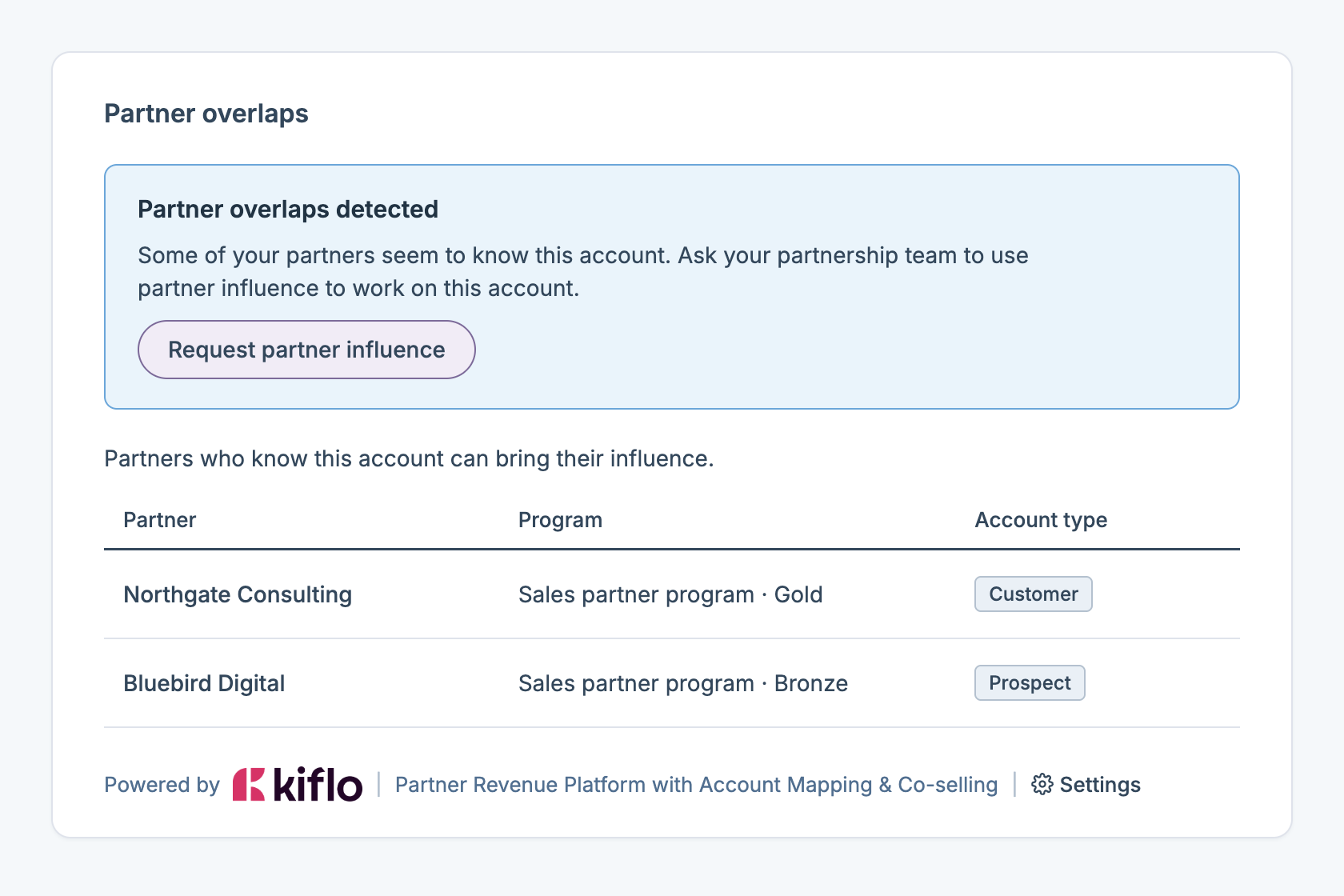
- The rep sees the overlap on the HubSpot record. Kiflo adds a Partner overlaps card to company, contact and deal records, fed by account mapping. For each partner that has the account in its data, the card shows the partner, its program and level, and whether the account is a customer, a prospect or an opportunity for that partner. On a deal, it covers the companies and contacts associated with the deal. Your own accounts are imported from a HubSpot list, static or dynamic, and refresh once a day, and partners upload their accounts by CSV.
- The rep asks for an intro without leaving HubSpot. From the card, the rep clicks Request partner influence and adds context, such as an introduction to a decision maker. The request names no partner: your partnership team chooses one, then accepts the request and starts a collaboration, or refuses it with a reason. The rep follows the request and the collaboration from a second tab on the same record. Partners never see the request, only the collaboration your team starts with them.
- Overlap counts are properties you can filter on. Kiflo writes four counts to a Kiflo properties group on companies, contacts and deals: all overlaps, and overlaps where the account is a prospect, an opportunity or a customer. On deals, the counts add up across the associated companies and contacts. Use them in HubSpot filters, views and lists.
- What the card needs. HubSpot connected to Kiflo, your HubSpot accounts imported into account mapping, and each viewer set up as a Kiflo coworker with the same email address. Adding the card takes permission to customize record views in HubSpot, and you add it once per object type. The help article names no HubSpot plan.
- You can see every sync. Each lead and deal shows its last sync date and a link to the HubSpot record, and a log lists the date, status, direction, HubSpot ID and error message of every attempt, filterable by status and date.
- Commissions follow the deal. Kiflo calculates the commission from the synced deal and prepares the payout. Your finance team pays.
Kiflo is listed on the HubSpot Marketplace as Kiflo PRM.
Teams turn partners into revenue on Kiflo. 450+ partnership teams since 2018, and 100+ 5-star reviews on G2.
Sellsy, a Kiflo customer, on its partner program as a whole:
"In the first year, we doubled indirect sales revenue." Mathieu Arles-Dufour, Head of Partnerships, Sellsy
Book a demo and we will show how a partner registers a deal, how it reaches HubSpot, how the stage syncs back, and how the Partner overlaps card appears on a HubSpot record. Book a demo.


