




Kiflo MCP Connector: Manage Your Partner Program from Claude and ChatGPT
Kiflo now has an MCP Connector. Any user from the vendor team who has access to Kiflo, including read-only users, can connect it to Claude or ChatGPT with one URL, then ask about partners, deals, rewards, and payouts in plain language. The same chat can create partners and leads and update deals, so a report or an upload takes one prompt instead of an export and a spreadsheet.
What is the Kiflo MCP Connector?
The Kiflo MCP Connector is a connector that lets an AI assistant read and update your Kiflo workspace, using the permissions of the person who connects it. It works with Claude and ChatGPT, and it sits next to your CRM connector, not in place of it.
MCP, the Model Context Protocol, is an open standard Anthropic introduced in November 2024 for connecting AI assistants to the systems where data lives. An assistant that speaks MCP can call the tools a connector exposes. Kiflo’s tools cover the partner program: partners, leads, deals, customers, transactions, rewards, payouts, and many more on the way.
What can you do with Kiflo in Claude or ChatGPT?
You can report on partner performance, import partners, and upload leads without leaving the chat. Each task below starts from a prompt you can paste.
Report on partner performance
Ask a question about the program and get the answer, or ask for a dashboard. Typical questions are which partners bring the most registered deals, and what each sales rep has in the pipeline. They normally need an export and a spreadsheet.
Which five partners have the most registered deals?
Build a dashboard of the deals partners registered, one view per sales rep.
Claude can return the dashboard as a live artifact you keep working on.
Import partners from your CRM
Connect your CRM in the same chat, such as HubSpot, and ask the assistant to find the partners created there and add them to Kiflo.
Find all partners created in HubSpot in the last 7 days and create them in Kiflo.
Upload leads from an Excel file
Drag an Excel file with leads into the chat and have the assistant submit them in Kiflo on behalf of a partner.
Submit those leads on behalf of partner Consulting Partner Inc.
Which Kiflo data can the assistant work with?
The assistant works with nine Kiflo objects, always inside the permissions of the connected user. It can search all of them. It can create and update partners, leads, deals, customers, transactions, payouts and notes, create rewards, and create, update, complete, and reopen tasks. If you cannot see payouts in Kiflo, the assistant cannot search them either.
| Object | What the assistant can do |
|---|---|
| Partners | Search, create, update |
| Leads | Search, create, update |
| Deals | Search, create, update |
| Customers | Search, create, update |
| Transactions | Search, create, update |
| Rewards | Search, create |
| Payouts | Search, create, update |
| Notes | Search, create, update |
| Tasks | Search, create, update, complete, reopen |
The assistant creates and updates records. It has no delete tools.
How do you connect Kiflo to Claude or ChatGPT?
You add Kiflo as a custom connector with one URL, sign in, choose the workspace, review the actions, and allow access. Everyone in the company with a Kiflo vendor account can connect the same way.
In Claude
- Copy the Kiflo connector URL from the Kiflo documentation.
- On a Pro or Max plan, go to Customize, then Connectors, choose Add custom connector, give it a name, and paste the URL. On Team and Enterprise plans, an Owner adds it under Organization settings, then each member connects it from Settings, then Connectors. Anthropic’s help article lists the steps.
- Sign in to Kiflo when asked.
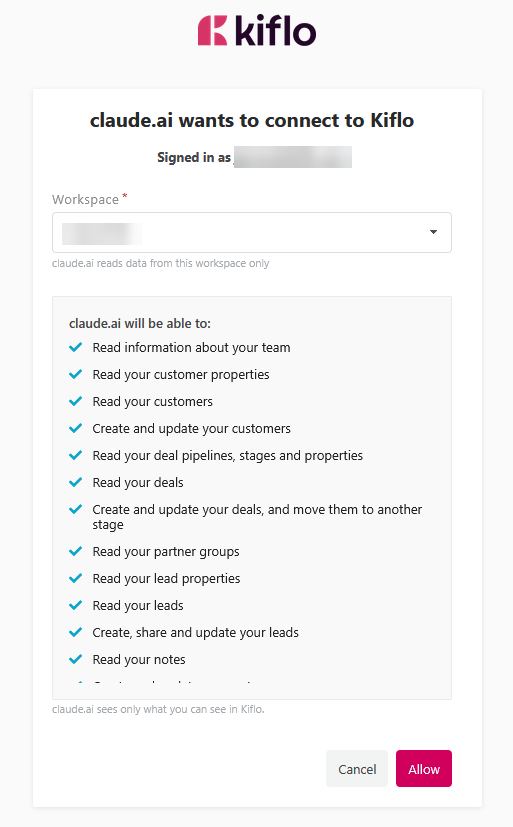
- On the Kiflo access page, choose the workspace if you have several, review the actions listed, and allow access.
In ChatGPT
- Copy the Kiflo connector URL from the Kiflo documentation.
- In ChatGPT, turn on developer mode, create a custom app, paste the URL, scan the tools, and complete the sign-in. OpenAI describes the steps in its Developer mode and MCP apps in ChatGPT help article. As of October 2026, the article lists full MCP support (in beta), including write actions, for ChatGPT Business, Enterprise, and Edu on the web, with read access for Pro.
- Sign in to Kiflo, choose the workspace, review the actions, and allow access.
Who can use it, and what can it see?
Any vendor user in your Kiflo workspace can connect it, and each person sees only what their own Kiflo permissions allow. The access page asks the user to pick a workspace when they belong to several. The connector is included on all Kiflo plans.
Today, the connector is built for the admins who run the program. Partners do not connect to it.
How does it work alongside your CRM connector?
Use your CRM connector for CRM records and the Kiflo connector for partner records, and ask both in one conversation. Both HubSpot and Salesforce publish their own MCP Connectors, so an assistant can hold your CRM and your partner program side by side.
HubSpot’s remote MCP server lets an assistant read and update contacts, companies, deals, tickets, and more. Salesforce made its hosted MCP servers generally available on 29 April 2026 for Enterprise Edition orgs and above.
Here is which connector answers which question:
| What you ask | Which connector answers |
|---|---|
| Which five partners registered the most deals? | Kiflo |
| Which leads did a partner submit this month? | Kiflo |
| What stage is this opportunity in our CRM? | HubSpot or Salesforce |
What is coming next?
A partner-facing connector is planned, so partners can upload leads, check their rewards, or search the resources from their own assistant. We are also adding tools to set up Kiflo itself from the chat, such as programs, rewards, and assets. When they ship, this article will be updated.
See it on your own program
Book a demo, and we will show you how the Kiflo MCP Connector works on a workspace like yours, from the first prompt to a finished partner report.


