


How to Manage Partner Co-Selling in HubSpot: A Step-by-Step Guide
Partner co-selling in HubSpot works when a rep can see which partners already know an account, ask for an introduction from the deal record, and have the partnership team run that request as a tracked collaboration. HubSpot holds the deal. A layer such as Kiflo adds the overlap view, the request and the collaboration.
What does partner co-selling in HubSpot mean?
Partner co-selling means working an account together with a partner who already has a relationship with it. In HubSpot, the account sits in company, contact and deal records, which HubSpot connects through associations. What the partners know about that account usually sits somewhere else: a spreadsheet, a Slack thread, a partner manager's memory. Co-selling in HubSpot is the practice of bringing that knowledge onto the record. For the full motion, see our co-selling guide.
HubSpot on its own vs HubSpot with Kiflo
HubSpot is the system of record for the deal. It does not include a partner overlap view of its own, so teams add a layer on top. Kiflo is one such layer. It connects to HubSpot and adds partner context to the record, and HubSpot stays where the deal lives. For a wider comparison, read PRM software for HubSpot.
| Question | HubSpot alone | HubSpot with Kiflo |
|---|---|---|
| Where does the deal live? | HubSpot | HubSpot |
| Which partners already work with this account? | Tracked outside the record | Partner overlaps card on the company, contact or deal |
| How does a rep ask for an introduction? | A message to the partnerships team | Request partner influence form with context |
| Who sees the request? | Whoever received the message | The partnership team only, never the partner |
| Where does the joint work happen? | Email and spreadsheets | A collaboration with notes, meetings, tasks and attachments |
What you need before you start
Five things need to be in place before the overlap card shows anything. The first is the Kiflo HubSpot integration.
- HubSpot is connected to Kiflo.
- Your accounts are imported into Kiflo Account Mapping from a HubSpot list, which refreshes once a day.
- Your partners have shared their own accounts, which they upload to Kiflo by CSV. Kiflo detects an overlap when an account of yours matches one of theirs.
- Each person who views the card is a Kiflo coworker with the same email address as in HubSpot.
- You have permission to customize record views in HubSpot. HubSpot's guide to customizing records says this takes the Customize record page layout permission or Super Admin access.
How to manage partner co-selling in HubSpot, step by step
The workflow has six steps. The rep owns the first three, the partnership team owns the fourth, and both follow the last two on the same record.
1. Pick an opportunity worth a partner's time
Start with a deal that is stalled or a target account you cannot get into. A partner introduction helps most where a trusted voice can change the buyer's view, such as a security review or a missing champion. Open the company, contact or deal record in HubSpot.
2. See which partners already work with the account
Add the Partner overlaps card to the record. You add it once per object type (company, contact and deal) from the Customize option in HubSpot, as described in HubSpot's guide to customizing records. For each overlap, the card shows the partner's name, program and level, and the account type: Customer, Prospect or Opportunity. A banner shows where things stand: overlaps detected, collaboration requested, request accepted, or collaboration in progress. An account with no overlap reads "No overlaps detected". The View in Kiflo link opens the same record in Kiflo. If you are new to the idea, what is account mapping explains how overlaps are found, and the Kiflo help article walks through the card.
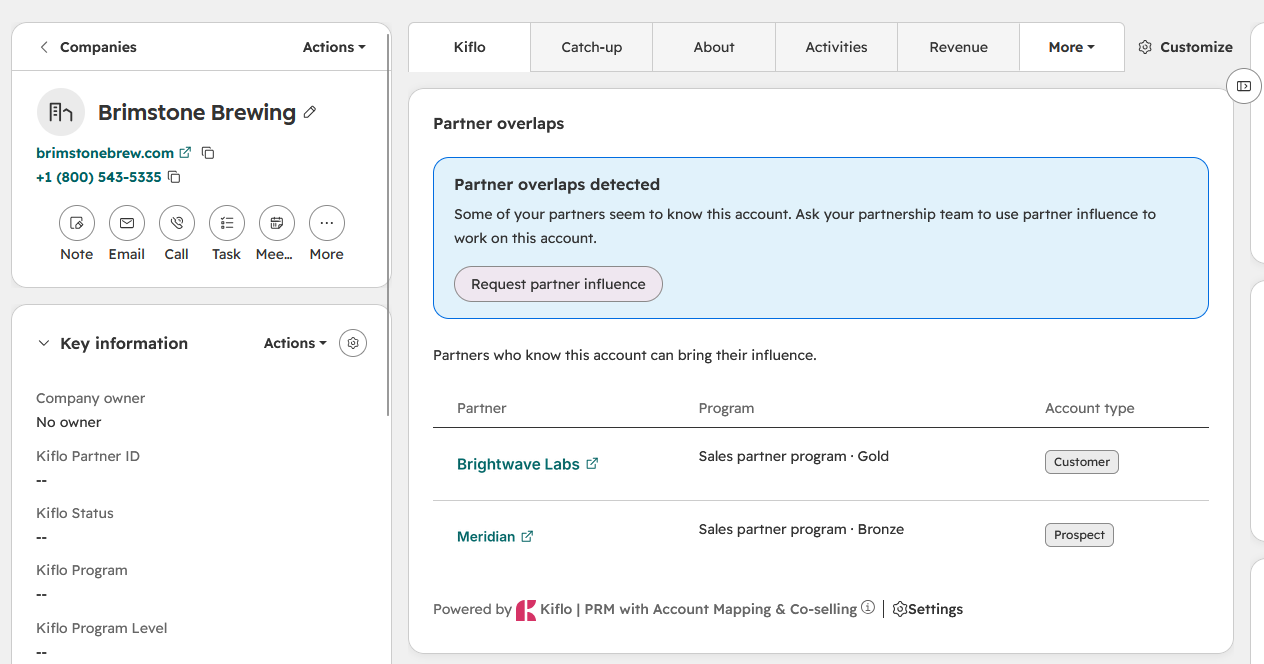
3. Request partner influence
From the card, the rep selects Request partner influence and adds context: why this account, what is stuck and what help would change it. The request goes to your partnership team, not to a partner. Partners never see it. Only one request can be pending per account at a time. Reps who work in Slack can start the same request from a Kiflo overlap alert there, with the Request partner influence button, and it reaches the same team. The Kiflo Slack integration guide shows how that works.
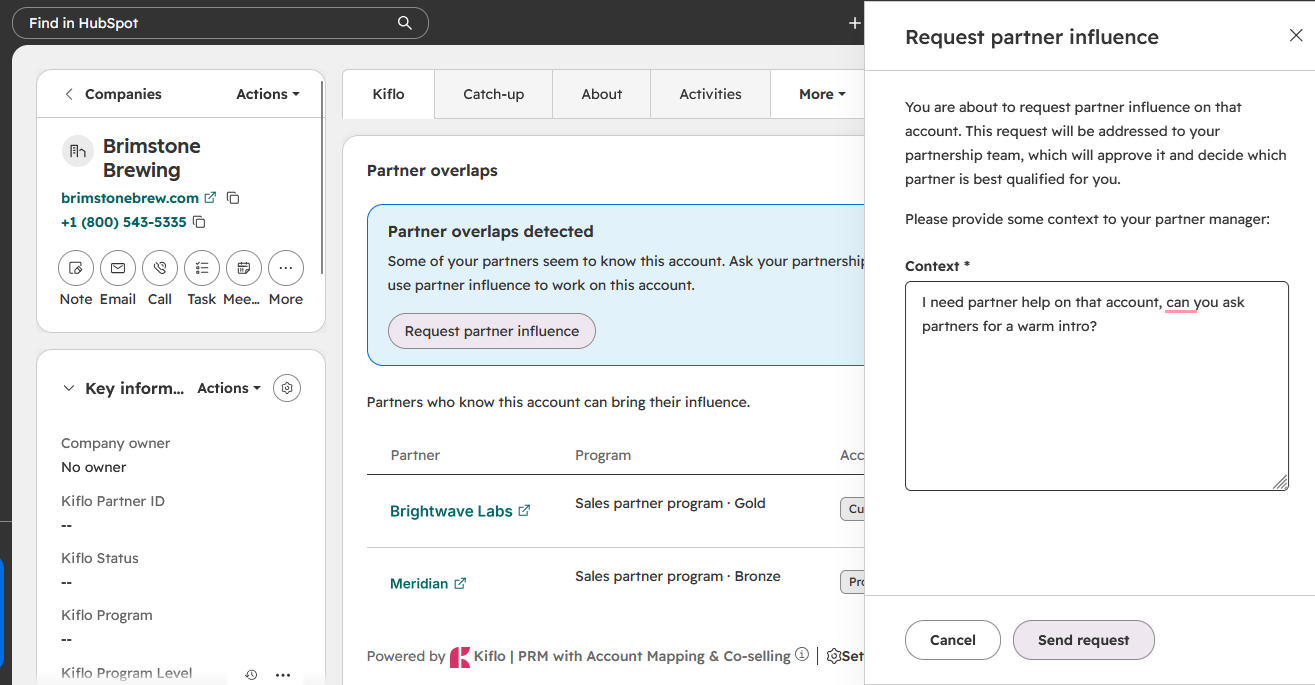
4. Let the partnership team decide and start the collaboration
The partnership team reads the request and picks the partner. A collaboration is created from an overlap, and it is named after the account and the partner. Partners only see collaborations that your team starts. The rep follows the outcome on a second tab of the card, where each request shows as Pending, Accepted or Refused, and a refusal includes the reason.
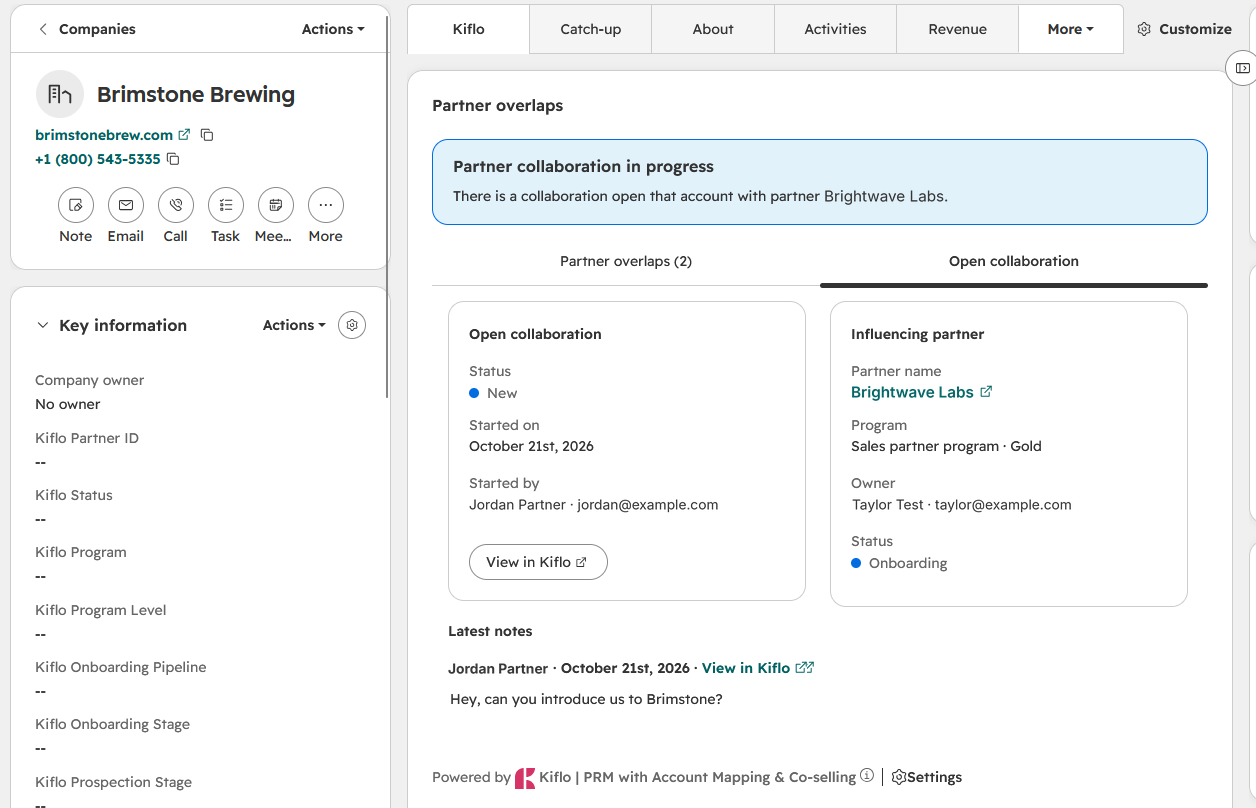
5. Assign and track the joint action
The collaboration page records the owner, the partner, the assigned contact and the linked account. Notes hold context and team comments, meetings and tasks track the next moves, and attachments hold related files. The rep sees the open collaboration and its recent notes on the HubSpot record, so nobody has to ask for an update by email.
6. Close the loop on the deal
When the deal moves or closes, keep the result with the collaboration: what the partner did, what the buyer said and what changed. Overlap counts are written to properties in the Kiflo properties group in HubSpot (see how HubSpot properties work), so the deal record carries the partner signal that your reports can use. Write down whether a partner opened the account or helped on a deal that was already open, because that decides how you count the revenue later.
Example: a stalled deal at Fernwick Analytics
This is a hypothetical scenario, not a customer story. Fernwick Analytics is a mid-market company in a late-stage deal that has stalled in security review. The rep cannot reach anyone who has run the same review before.
| Stage | Who | What happens |
|---|---|---|
| Spot the stall | Rep | Opens the Fernwick Analytics deal in HubSpot and sees the Partner overlaps card |
| Find the overlap | Rep | The card lists one partner whose Fernwick Analytics account is a Customer |
| Ask for help | Rep | Selects Request partner influence and writes that the deal is stuck in security review |
| Decide | Partnership team | Reads the request, picks that partner and starts a collaboration |
| Work the account | Partner manager | Assigns a task to the partner contact and logs the call in the collaboration notes |
| Close the loop | Rep | Sees the notes on the deal, finishes the review and records the result |
How do you measure partner-influenced revenue?
Count partner-influenced revenue at the deal level, and separate it from partner-sourced revenue. Sourced means the partner brought you the account. Influenced means a partner helped on a deal that was already open, as in the Fernwick Analytics example. Keep the two apart in your notes, because they answer different questions. Sourced revenue shows which partners generate pipeline, and influenced revenue shows where partner help speeds up or saves deals. An account overlap alone doesn't qualify a deal as partner-influenced. Record the partner's actual contribution, link it to the opportunity, and apply your program's attribution rules before including the deal in influenced revenue reporting. For the wider reporting picture, read our guide to the partner revenue platform, see how the analytics dashboard reads partner performance, or look at revenue tracking in Kiflo.
Common mistakes in HubSpot co-selling
- Requesting without context. A request that says "please help" gives the partnership team nothing to act on. State the account, the blocker and the help you want.
- Treating an overlap as a warm introduction. An overlap means you and a partner both work with the same company. It does not show how strong the partner's relationship is. The partnership team makes that call.
- Going around the team. If reps message partners directly, the team loses track of who has been asked, and the partner gets several requests for one account.
- Letting the account import go stale. Your own accounts come from a HubSpot list that refreshes once a day, and partners upload theirs by CSV. An account that is missing from your list or from a partner's file cannot show an overlap.
- Never recording the outcome. Without a note on what the partner did, the revenue cannot be counted as influenced later.
When should you add software?
A spreadsheet and a Slack channel can carry a handful of partner introductions. Software earns its place when reps start asking for introductions on live deals and the partnership team cannot see who asked, who answered and what happened. At that point the overlap card, the request and the collaboration give you one record per account. See Kiflo co-selling and our list of the best co-selling software.
Run one stalled deal through the workflow
Co-selling in HubSpot comes down to one habit: every request for a partner's help starts on the deal record, goes through the partnership team and ends with a note on what happened. Start with one stalled opportunity and run it through the six steps.
Bring one open HubSpot opportunity to a Kiflo demo. We will show you how the overlap card, the request and the collaboration work on a deal like yours.


